
Your database, worked every morning.
Prospecting OS answers your new leads, reconnects the ones that went quiet, and keeps your past clients warm. It writes the emails as drafts. You hit send.
Five things to know first
- Claude is an app, made by a company called Anthropic. Prospecting OS runs inside it. Claude is software, not a person on our team.
- Prospecting OS is included with your coaching. There is nothing to buy from us.
- You do need a paid Claude plan, Pro or higher. That subscription is paid to Anthropic, not to us.
- You need Gmail. Every email it writes lands in your Gmail Drafts folder for you to read and send. Not on Gmail? Email your Coaching Success Manager and they will set up a one-on-one implementation session with one of our team.
- It moves in with your AI OS. Prospecting OS lives inside the same AI OS Assistant Project you already have. You are not creating anything new.
Finish your AI OS and Constitution first.
This builds on top of them.
One thing first: you need your computer
This runs in the Claude app on a desktop or laptop. You cannot finish it on a phone. Send yourself the link and pick it up at your desk.
prospecting.chiragshahcoaching.com
Four jobs, running at once.
New leads, answered overnight
An inquiry lands at 11pm. By morning a warm reply is waiting in your drafts, in your voice, so you answer first.
Past clients, kept warm
Five personal notes a day to the people most due to hear from you. The relationships that already trust you keep producing.
Cold leads, brought back
The listing appointment that never listed. It finds them in your email and gives you a reason to reconnect.
Your whole book, on one screen
The Book of Business X-Ray scores your database out of 100 and shows you the fastest thing to fix.
See the X-Ray →Why five a day?
Five is the comfortable default. During setup Claude works out the number that would bring your whole database around once a quarter and tells you both, so you can choose. Any morning you want more, say give me ten today.
Two things have to be true.
If either one is missing, the install cannot finish. Check both now, it takes ten seconds.
1. A paid Claude plan
Pro or higher. The Opus model is paid only, and it is the one that runs your setup. On the free plan this cannot run at all.
How do I know which plan I am on?
Open Claude, click your name at the bottom left, then Settings. Your plan is at the top. If it says Free, upgrade before you go further. After upgrading, quit Claude completely and reopen it, or the change will not show up.
2. Your AI OS, finished
Including your Constitution. Prospecting OS installs into your AI OS Assistant Project and builds straight on top of them, which is why this install is short. Your Voice carries over instead of being rebuilt. Without your AI OS there is nowhere for this to live, so finish that first.
How do I know if mine is finished?
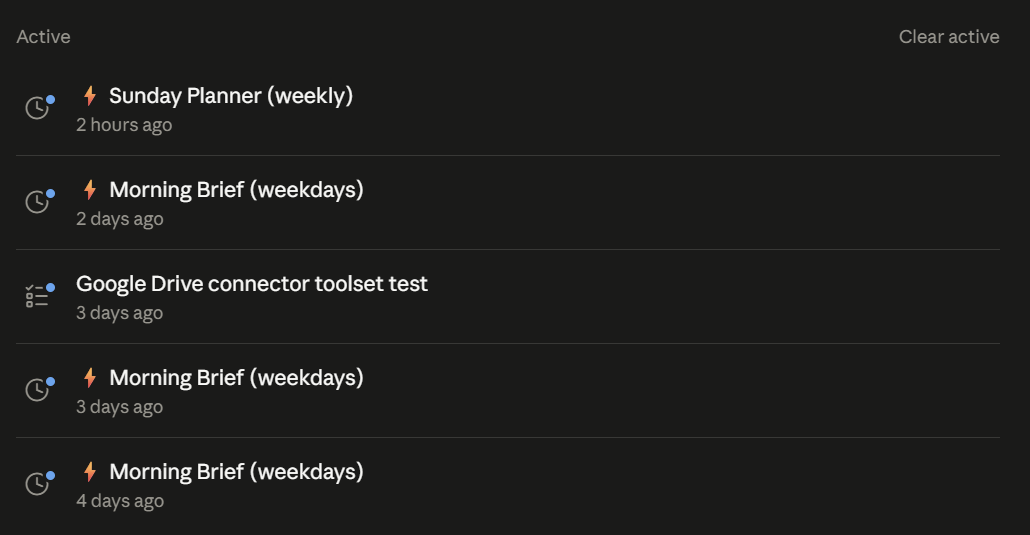
Open Claude and look at your left sidebar. If your AI OS is running you will see a scheduled Morning Brief and a Sunday Planner sitting there. If you see neither, your AI OS is not installed yet. Watch the session linked above first, then come back. Nothing here is lost by waiting.
Six small things.
About 20 minutes, and most of that is Claude working while you watch. Do these in order.
Would rather someone did this with you?
We run one-on-one tech implementation sessions for exactly this: just you and one of our team, not a group call. Ask your CSM and they will get it set up.
No pressure either way. The six steps below take about twenty minutes on your own, and most of that is Claude working while you watch.
Download the file
Do not unzip it. Leave it exactly as it lands. Claude opens it.
Where did it go, and what if it opened itself?
Your Downloads folder. You do not need to move it, open it, or rename it. You will point Claude at it in step 4.
On a Mac it may unzip itself and leave you a folder instead of a file. That is Safari, not you. If that happens, the folder is fine: in step 4 just add everything inside it, all nine files at once.
Open your AI OS Project
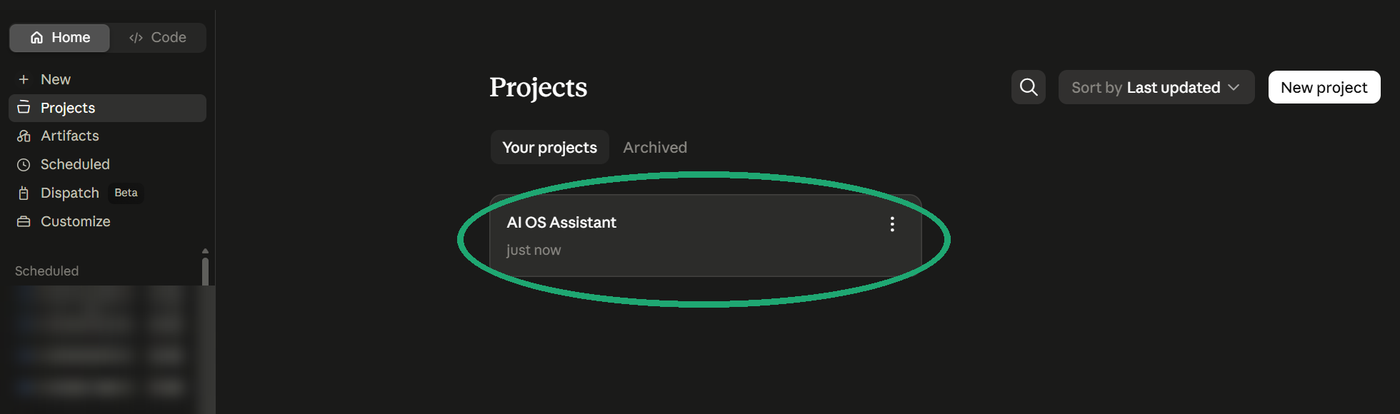
Left sidebar: Projects, then click AI OS Assistant. That is where this lives. You are not making a new Project.
What is a Project, again?
A saved workspace inside Claude. Think of it as one folder that remembers everything. You made it during your AI OS setup, and now your prospecting moves in too: your database, your writing style and your dashboard all live there, alongside your AI OS. One Project, your whole office.
Add the file with the + button
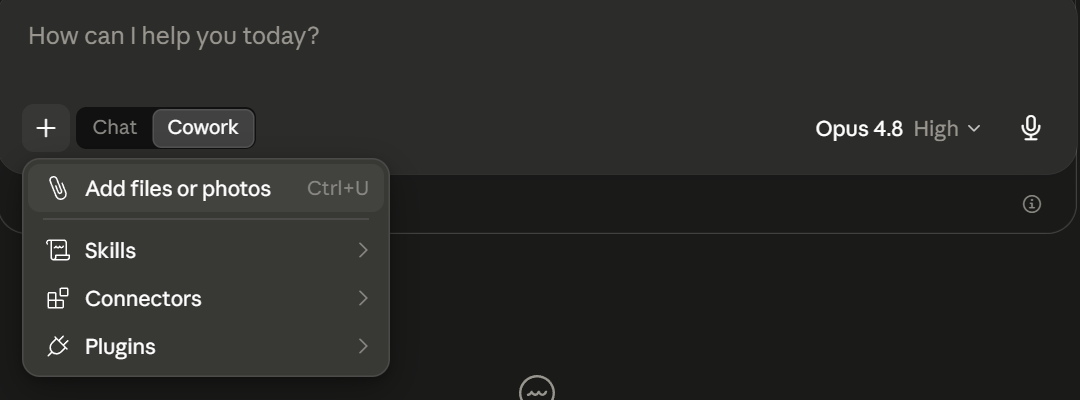
- Click + in your message box.
- Click Add files or photos.
- Pick the file from step 1.
Just that one file. Claude asks for your Compass contacts later.
It says files are missing
No problem, it just did not attach. Add it again the same way. Nothing else to change.
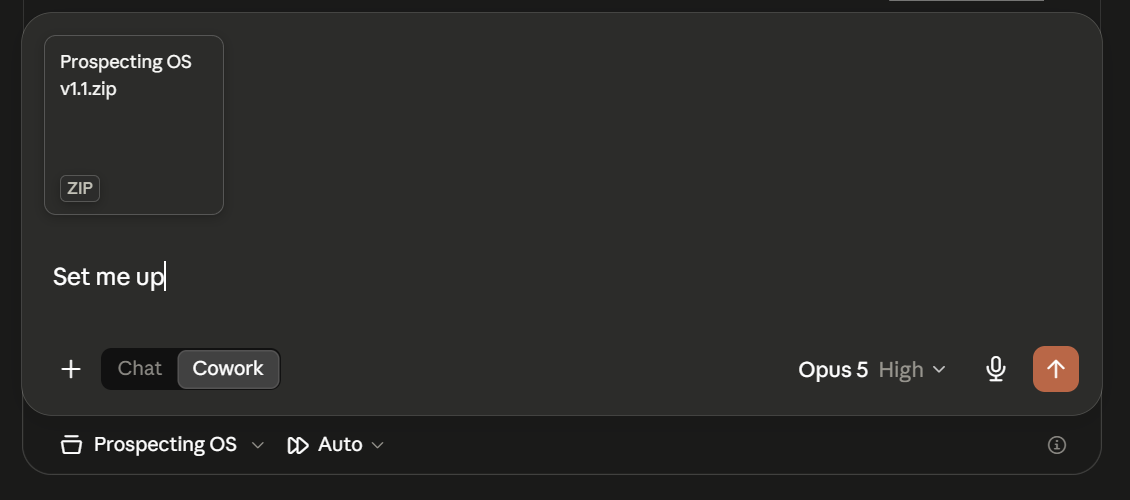
Set the model to Opus, then say this
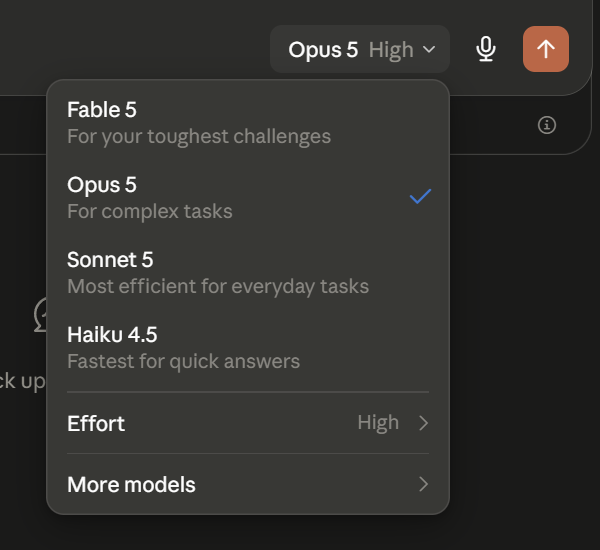
Use the model picker near the message box.
set me up
Type it in the message box and press enter.
There is no Opus in the list
This is the picker you are looking for. If Opus is not in your list, you are on the free plan and it is paid only. Upgrade here, then quit Claude and reopen it.
Export your Compass contacts
Your only real homework. Claude asks for this when it is ready. About a minute.
- In Compass: Contacts, then Actions, then Export.
- Name the file prospectingOS export.
- In the settings, select All contacts data and include notes.
- Click the Export contacts button.
The notes are what make every email sound like you actually remember the person. Do not skip that box.
What else will Claude ask me for?
Two clicks, and it walks you through both: adding that export file to your Project, and approving one permission so it can schedule your morning brief. That is everything. The rest is Claude working while you watch.
How you know it worked.
Your X-Ray appears on your screen
At the end of setup Claude builds your Book of Business X-Ray: your whole database scored out of 100, live on screen, with your real names and real numbers on it.
If you are looking at that score, it worked. Nothing else in Claude looks like it, and it cannot exist unless your database was built properly.
What about the Morning Brief in my sidebar?
That was already there from your AI OS, so it is not proof of anything today. Setup upgrades the brief you already have rather than adding a second one, so your sidebar looks the same before and after. You still get one brief a morning, it just does more now.
The difference shows up tomorrow morning: your brief starts arriving with new-lead replies and past-client notes already drafted.
Am I going to get two morning briefs now?
No. Setup finds the one you have and improves it in place. One brief, every weekday, same as before.
Tomorrow morning, your brief is waiting.
Your day prepped, your new leads answered, and your past clients hearing from you. In your voice, quarter after quarter.
If you get stuck, ask Claude first
There is a coach built into the download. It checks what actually went wrong instead of guessing, and walks you out of it one step at a time.
Read COACH.md and help me.
In your AI OS Assistant Project. Any time, today or in six months.
Tried that and still stuck? Email your Coaching Success Manager.